


Meta Horizon
4.520.60K Reviews
App Specs
- Version
- 379.0.0.17.244
- Updated On
- License
- Free
- Downloads
- 10,000,000+
- Developer
- Meta Platforms Inc
- Categories
- Adventure
- Platform
- Android, iOS
Screenshots
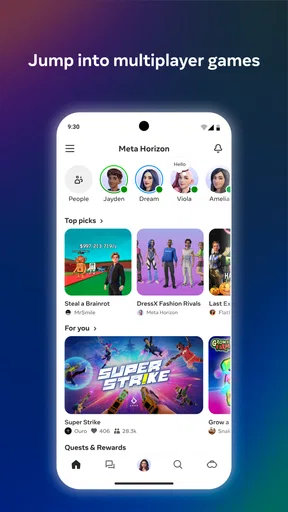
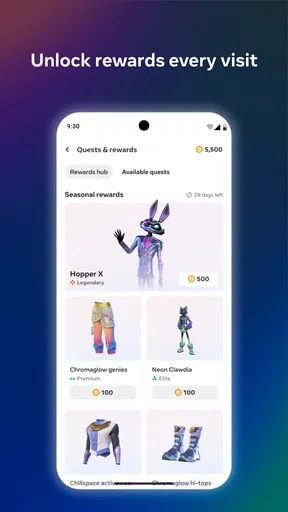


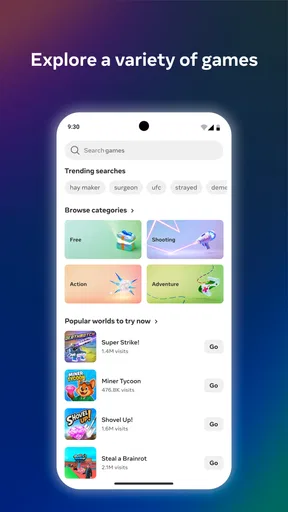
 Analysis by AppCompare
I approach a shared virtual space differently from a game with a clear campaign: I want to know what I can do first, how the experience responds, and whether I have a reason to come back. Meta Horizon is an adventure game from Meta Platforms Inc, but its appeal is broader than a single challenge. It brings social spaces, games, and work-oriented rooms together, so a session can shift from exploring to playing or simply spending time with other people. That variety is its main draw, though it also means the experience is less focused than a traditional adventure with one central goal.
Finding a reason to step in
Before choosing it, it helps to know what kind of experience you are signing up for. The game is free to install, has a Teen age rating, and includes optional in-app purchases priced from five cents to $99.99 per item. Its current version is 349.2.0.46.104, and it requires Android 8.0 or later. It has a 4.6 average from around 113,000 ratings and more than 10 million installs, which suggests that it has reached a broad audience. Those figures are useful context, but they do not tell you whether its open-ended, social style matches the way you like to play.
Your first move sets the tone
First things first, getting started with Meta Horizon is a breeze. The setup guides you through creating your avatar, and I must say, the customization options are pretty impressive. You can tweak everything from your hairstyle to your outfit. It’s like playing dress-up, but way cooler. Once you're in, the app opens up into a sprawling virtual space teeming with possibilities.
That first choice matters more than it might seem. If I want a low-pressure start, I would spend a little time getting comfortable with my avatar and looking around before joining a busy room. If I have friends ready to meet, I would make that the first destination instead. This is not the kind of game where a single opening mission explains everything; it is easier to find my footing by picking one clear purpose for the session rather than trying to inspect every option at once.
Social spaces reward the right company
One of the standout features is how easy it is to connect with others. Whether you're catching up with friends or meeting new people, the app makes socializing simple and fun. There are various themed rooms you can explore, each offering a unique vibe. From chill coffee shops to bustling clubs, there’s a spot for every mood.
You can even host virtual parties! Yes, you heard that right. Invite your friends, pick a theme, and rock the night away without leaving your couch. The interactive elements make these gatherings feel surprisingly real.
For an everyday use case, I can picture opening it after dinner when a friend is free but neither of us wants to plan an outing. We could meet in a quieter themed room, talk for a while, and decide whether to try a game together. That is a more convincing reason to return than simply browsing spaces alone: the social plan gives the session a shape. On the other hand, if my friends are not using it and I do not feel like meeting strangers, the social side loses much of its pull.
Worth Reading Before You Choose

Flipboard Shows What News Apps Must Do Beyond the Feed

Switching to Android Auto Means Rethinking Your Driving Routine

Google Calendar Makes a Crowded Week Easier to Manage

Ludo King Makes the Most of the Minutes Between Plans

Baby Panda World Brings Quick Play to Modern Phones, but Its Game Library Feels Busy

ESPN’s Live Game View Makes Following Close Games Easier
I would also treat public social spaces as places to enter with a little intention. Choose a room that suits your mood, and give yourself permission to leave if the atmosphere is not for you. That small habit makes exploration feel more manageable than wandering from one busy space to another in search of a perfect fit. A virtual hangout is most enjoyable when the people and setting work together; the room itself cannot guarantee a good conversation.
Games give a session a clear target
If you’re a gamer at heart, Meta Horizon has you covered. The app boasts a range of mini-games that are both entertaining and addictive. Whether you’re into trivia, puzzles, or action-packed challenges, there’s something here to keep you hooked. I found myself losing track of time while trying to beat my high scores.
And if you’re competitive, playing against friends or other users adds an exciting layer to the experience. There's nothing like a bit of friendly competition to spice things up!
The useful rhythm here is simple: pick a small challenge, see how you did, and decide whether you want another attempt. A high score or a friendly match gives the session an immediate target, while the chance to switch activities keeps a disappointing round from becoming the whole evening. I would use the mini-games as a break between conversations or as the main event when a group wants something more active than sitting and chatting.
That flexibility is also a trade-off. If I want a deep progression system, a carefully paced story, or one polished challenge that builds for hours, a dedicated adventure or puzzle game is likely a better choice. The mini-games work best as accessible activities inside a wider social experience, not as a replacement for a focused single-player game. In practical terms, I would go in expecting variety and short goals, rather than a long campaign that steadily unlocks a bigger narrative.
Work rooms are a different kind of play
Now, here’s where things get interesting. Meta Horizon isn't just about fun and games; it’s also a space for productivity. The app includes virtual meeting rooms where you can collaborate with colleagues or clients. The seamless integration of tools like screen sharing and document editing makes remote work feel less remote.
For those of us who have embraced the work-from-home lifestyle, this feature is a game-changer. It’s like having the office at your fingertips, minus the commute.
I would keep that use case separate from casual play when deciding whether the app is worth installing. A virtual room can make a remote meeting feel more like sharing a place, but it is not automatically better than a standard video call. If a colleague needs a quick answer or everyone is already comfortable with a conventional call, the simpler option may be faster. I would save a virtual meeting for a group that actually benefits from gathering in a shared space, rather than choosing it just because it is available.
There is a practical reason to make that distinction: an app that supports several kinds of sessions can invite you to do everything in one place, but each activity asks for a different mood. I would not open it expecting a quiet productivity tool and then be surprised that its identity is also social and playful. For focused solo work, a dedicated work app is usually the more direct choice; for a meeting where a shared virtual setting helps people feel present, this kind of room has a clearer purpose.
What brings me back—and when I would leave
The feedback and reward are modest but easy to understand: a conversation gives me company, a game gives me a score or a friendly result, and a meeting gives a group a place to work together. After that, the session can reset without much ceremony. I can change rooms, switch from talking to a mini-game, or simply stop and return another time. That low-pressure reset is useful for short visits, but it also means the game does not always provide a strong reason to continue if no activity or person has caught my interest.
My best practical tip is to decide on a session goal before opening it: meet one friend, try one game, or explore one kind of room. That keeps the range of options from turning into aimless browsing. I would also think carefully before buying anything. The app is free, but the presence of in-app purchases means it is sensible to treat optional spending as a separate choice rather than part of the basic reason to try it. Someone who wants a straightforward, self-contained game with no social component may prefer a conventional mobile adventure instead.
The Future Awaits
Overall, Meta Horizon is more than just an app; it’s an experience. Whether you’re looking to socialize, play, or work, it offers a dynamic platform that caters to a variety of needs. While it’s not without its minor hiccups, the potential here is undeniable.
If you're curious about what the future of virtual interaction looks like, this is definitely an app worth checking out. Who knows? You might just find your new favorite hangout spot in the digital realm. Ready to explore? The future is waiting.
Pros
- Immersive VR experience with realistic graphics.
- Wide range of social and interactive features.
- Regular updates introduce new worlds and events.
- User-friendly interface for easy navigation.
- Supports cross-platform play for wider access.
Cons
- Requires high-end VR hardware for best experience.
- Limited offline functionality limits access.
- Some connectivity issues reported by users.
- App size can be large
- requiring ample storage.
- Occasional bugs can disrupt gameplay.
FAQs for Meta Horizon
What is Meta Horizon and what can I do with it?
Meta Horizon is a virtual reality platform that allows users to explore immersive worlds, engage in social interactions, and participate in a variety of games and activities. Whether you're looking to meet new people, host virtual events, or explore different environments, Meta Horizon provides a versatile space for creativity and connection.
What devices are compatible with Meta Horizon?
Meta Horizon is primarily designed for use with Oculus VR headsets, providing an optimized virtual reality experience. However, it may also have limited functionality on other VR platforms. For the best experience, ensure your device meets the recommended specifications and check for any compatibility updates from Meta.
Is Meta Horizon free to use, or are there in-app purchases?
Meta Horizon is free to download and explore, offering a wide range of activities and environments at no cost. However, there are optional in-app purchases available, such as customization items and exclusive experiences, that can enhance your virtual reality experience. These purchases are not necessary to enjoy the core features of the app.
How does Meta Horizon ensure user safety and privacy?
Meta Horizon prioritizes user safety and privacy by implementing robust security measures and community guidelines. Users can control their privacy settings, report inappropriate behavior, and block or mute other users if necessary. Meta also employs moderators to oversee interactions and ensure a safe virtual environment for everyone.
Can I create my own content or environments in Meta Horizon?
Yes, Meta Horizon offers tools for users to create and personalize their own virtual spaces. You can design environments, host events, and share your creations with the community. This feature encourages creativity and allows users to contribute unique content to the platform, enriching the overall experience for everyone.


